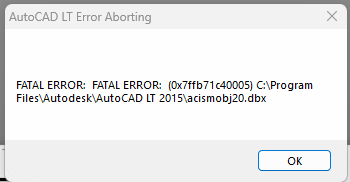
If you are running AutoCAD LT 2014 on Windows 11 and you receive this error…
The issue is that you are running 64bit AutoCAD LT 2014 on Windows 11, this is an old version of AutoCAD which is easily affected by Windows Updates pushed by Microsoft. You need to install the 32bit version of AutoCAD LT 2014 instead as it is not as easily affected by the latest Windows components. To solve the problem, you must first uninstall your existing AutoCAD LT 2014 (do not install along side as it will not work) and then follow these instructions to install the 32bit version (which is much more reliable and actually runs faster)
Copyright 2024 (c) Longbow Software
Follow these instructions to solve issues around installing/running your legacy AutoCAD Mechanical 2002 on Windows 11 Ransomware Protection Windows 11 and…
These instructions solve issues around installing/running and the stability of your old AutoCAD Land Desktop 2009 running on 64bit Windows…
These instructions solve issues around installing/running and the stability of your old AutoCAD LT 2010 running on 64bit Windows 11.…
Follow these instructions to solve issues around installing/running your legacy AutoCAD R13 on Windows 11 Ransomware Protection Windows 11 and AutoCAD…
These instructions solve issues around installing/running and the stability of your old AutoCAD 2009 running on 64bit Windows 11. Some…
Follow the instructions on this page to install ACT! V6 (by Interact Commerce Corporation) on Windows 11. How to install…