Categories: MicrosoftReviver

Installing Microsoft Money 2000 on Windows 7, Windows 8 and Windows 10

Installing Microsoft Money 2000 on WIndows 7, Windows 8 and Windows 10 (both 32bit and 64bit) can be very easily defined in these short steps…

  1. First, you need to purchase a copy of the Longbow Reviver tool here (you need V4.21 or later)
  2. Using Windows Explorer, backup your entire Microsoft Money 2000 installation CD to your hard drive, to a folder path c:\InstallCDs\Microsoft Money 2000
  3. Start the Longbow Reviver tool
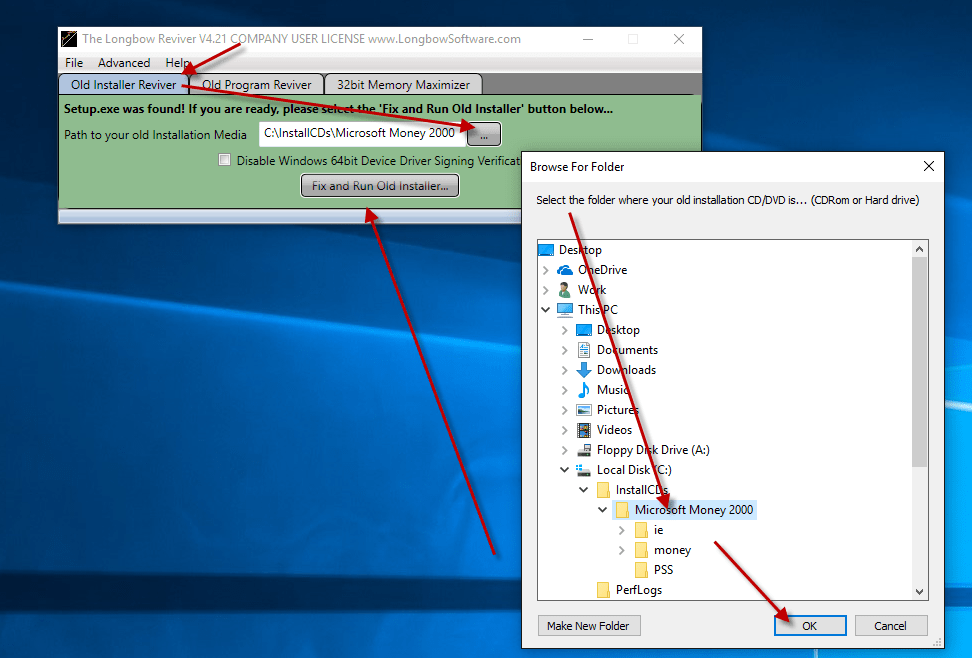
    1. select the 1st tab “Old Installer Reviver
    2. then using the ‘…’ button pick the c:\InstallCDs\Microsoft Money 2000 folder

      Selecting the Microsoft Money 2000 CD on Disk

    3. Now click the ‘Fix and Run Old Installer’ button
    4. Read and understand all the prompts that appear, then continue by clicking OK.
    5. Once the Microsoft Money 2000 setup appears, install as normal *except* when prompted for the installation path, set it to c:\MsMoney2000 e.g.

      Setting the Microsoft Monet 2000 installation folder

    6. Once the setup is complete
      1. Do not reboot (if prompted to do so)
  4. Now Microsoft Money 2000 is installed, next
    1. Make sure the Microsoft Money 2000 setup is completely closed, then in the Longbow Reviver tool…
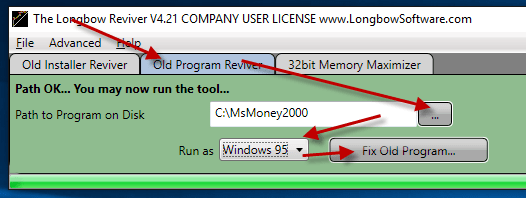
    2. Select the 2nd tab “Old Program Reviver
    3. Using the ‘…’ button, pick the newly installed C:\MsMoney2000 folder
    4. Set the Run As dropdown to Windows 95 Windows NT 4 (sp5)
    5. next, click ‘Fix Old Program’
      1. Say ‘No’ if the Reviver tool asks if you want to re-register… e.g.

        Fixing the Microsoft Money program files

  5. Now you can happily run your Microsoft Money 2000 on Windows 7, Windows 8 or Windows 10!

Copyright 2018 (c) Longbow Software

simonbooth

I just joined the Longbow Software team as a Software Engineer, and I have gladly offered to post some informative blogs for you all to read. Check on the left there, for all my blog entries...

Recent Posts

Installing 32bit AutoCAD Land Desktop 2009 (LDT) on Windows 11

These instructions solve issues around installing/running and the stability of your old AutoCAD Land Desktop 2009 running on 64bit Windows…

2 months ago

Installing 32bit AutoCAD LT 2010 on Windows 11

These instructions solve issues around installing/running and the stability of your old AutoCAD LT 2010 running on 64bit Windows 11.…

2 months ago

Install AutoCAD R13 on Windows 11

Follow these instructions to solve issues around installing/running your legacy AutoCAD R13 on Windows 11 Ransomware Protection Windows 11 and AutoCAD…

6 months ago

Installing 32bit AutoCAD 2009 on Windows 11

These instructions solve issues around installing/running and the stability of your old AutoCAD 2009 running on 64bit Windows 11. Some…

7 months ago

Install ACT! V6 on Windows 11

Follow the instructions on this page to install ACT! V6 (by Interact Commerce Corporation) on Windows 11. How to install…
7 months ago

Installing AutoCAD Mechanical Desktop (MDT) 2004 on Windows 11

NOTE: We currently only support US unlocked versions of 2004 on 64bit OS. European or locked US support 2004 is…

9 months ago

This website uses cookies.